
 Smart Agent Teams
Budgets and costs
Monthly budgets in cents, how spend is counted, and when an agent is paused.
Every run reports what it cost, and SAT adds those costs up per agent, per project and per company for each calendar month. You can give the company, each agent and each project a monthly budget. Only the agent budget is enforced: when an agent's spend reaches it, the agent is paused and the board gets a budget_override approval. Company and project budgets are shown next to their spend so you can see where money goes, but they never stop work.
How it works
Budgets
| Budget | Field | Who can change it | Enforced |
|---|---|---|---|
| Company | monthly_budget_cents on the company | owner or admin | No. Shown on the dashboard, the costs screen and sat dashboard. |
| Agent | monthly_budget_cents on the agent | Any member | Yes, when a run finishes. |
| Project | monthly_budget_cents on the project | Any member | No. Shown on the project page and the costs screen. |
All budgets are integer cents and default to 0, which means no limit. 150000 is $1,500.00. The web app and CLI take dollars and convert.
Spend
Spend for a month is the sum of cost_cents of the runs created (queued) in that month:
- Months are UTC calendar months. "This month" starts on the 1st at 00:00 UTC.
- Agent spend groups runs by
agent_id. Company spend is all runs in the company. - Project spend groups runs by the project of the run's task as it is now. Moving a task to another project moves its past spend with it. Runs without a task (a wake with no task, or a run whose task was deleted) count as "No project".
- A run's cost counts from the moment the runner reports it. A run still in progress usually counts
0, and a run queued on the 31st that finishes on the 1st counts toward the earlier month.
Enforcement
The check runs every time a run finishes: a runner's final report, a cancel, a lease expiry, or termination. It does not run when a run is queued or while it runs, so a run that starts under budget is never interrupted, and the agent can end up over budget by the cost of its last run. Agents that are already paused, pending_approval or terminated are skipped.
A paused agent is not woken by assignments, routines or the scheduler, and its queued runs are not claimed. To put it back to work, approve its budget_override (see Approvals for exactly how the budget changes), raise its budget and resume it, or resume it without changes (it will be paused again after its next run if it is still over).
Where costs come from
SAT does not price tokens. cost_cents is whatever the runner reports with the run.
Adapter in sat runner | Tokens | Cost |
|---|---|---|
Claude Code (claude_code) | Input (including cache reads and writes) and output tokens from Claude Code's result. | Claude Code's own total_cost_usd, rounded up to whole cents. |
Codex (codex) | From Codex's usage events. | Only if the runner process sets SAT_CODEX_PRICE_IN and SAT_CODEX_PRICE_OUT (US dollars per million input and output tokens). Otherwise the run costs 0 and never counts toward a budget. |
Simulated (--simulate) | Echo adapter values. | No model calls. |
SAT_CODEX_PRICE_IN=1.25 SAT_CODEX_PRICE_OUT=10 sat runner startA custom runner reports tokens_in, tokens_out and cost_cents in its PATCH /runs/{run_id} calls; see Custom runner. All amounts are shown in US dollars, whatever your locale preference.
Fields
The costs report, GET /costs (Costs):
Prop
Type
Each CostLine:
Prop
Type
Agents and projects also carry spend_mtd_cents (spend since the 1st of the current UTC month) in every agent and project response, and the dashboard has spend_mtd_cents and monthly_budget_cents for the company.
Use it
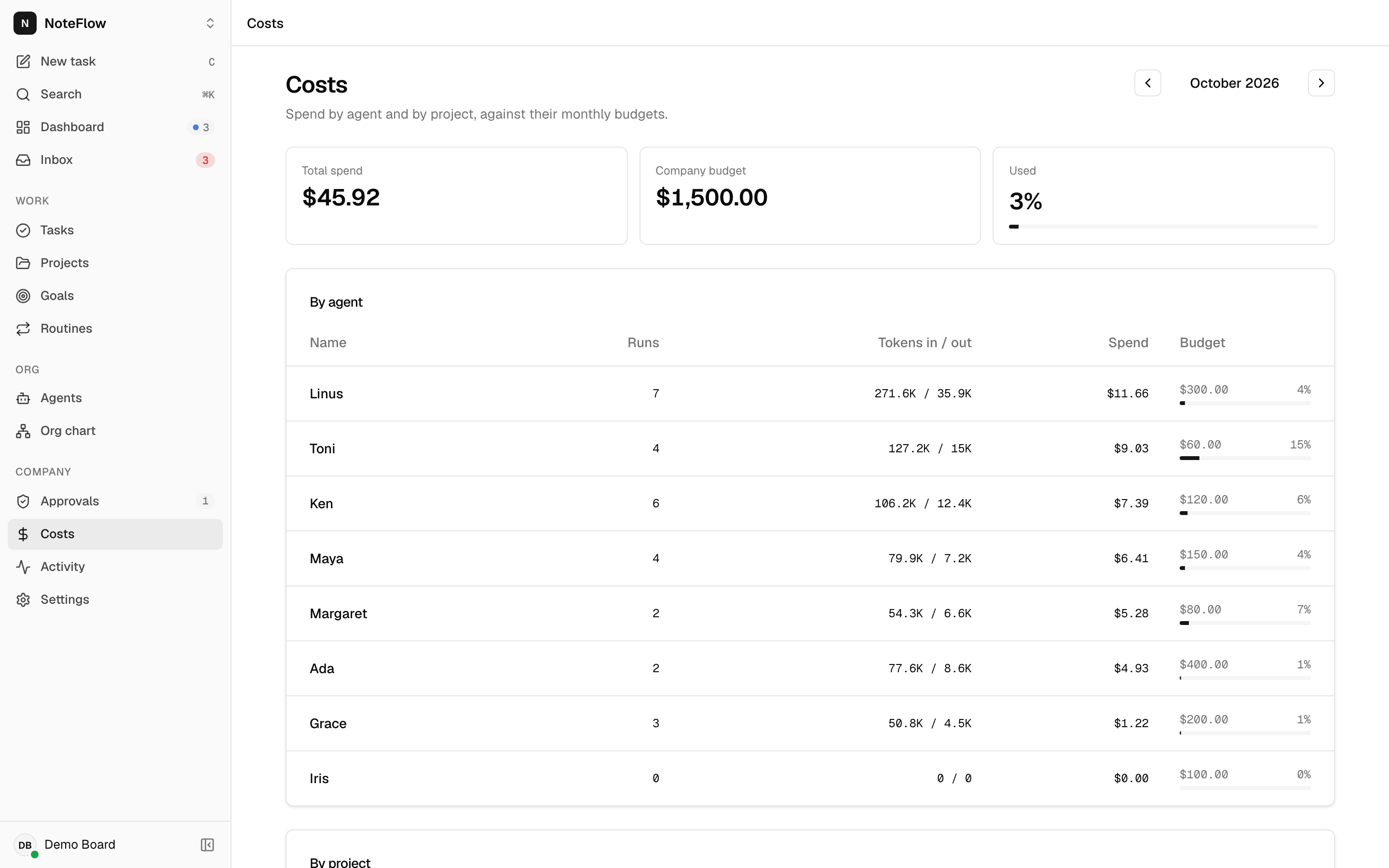
- Costs shows the month's Total spend, the Company budget and Used, then By agent and By project tables with runs, tokens, spend and a budget bar per line (red from 90%). Use the arrows to move between months; the month is kept in the URL as
?month=2026-10. - The dashboard's Spend this month card shows company spend with a bar against the company budget, or "No company budget".
- Set the company budget in Settings (owners and admins; leave it empty for no limit). Set an agent budget when you hire it or on the agent's page. Set a project budget when you create the project.
Permissions
| Action | Who |
|---|---|
| Read costs, spend and budgets | Any member |
| Change the company budget | owner or admin (403 FORBIDDEN otherwise) |
| Change agent and project budgets | Any member |
Approve a budget_override | Any member |
Non-members get 404 NOT_FOUND.
Events
Budgets and costs have no events of their own. Spend changes arrive as run.updated; a budget pause sends agent.updated and approval.created; budget edits send company.updated, agent.updated or project.updated. The web app refreshes the costs screen on run.* and agent.* events.
Limits and known gaps
- Company and project budgets are not enforced. Spend can exceed them without any pause or approval.
- Enforcement happens only when a run finishes. A long run can overshoot the agent's budget by its own cost.
- Budgets in the costs report are today's values, not the values that applied in a past month.
- Codex runs cost nothing unless the runner sets prices, so Codex agents are never paused for budget by default.
- The month is always UTC; your time zone preference does not change month boundaries.
- There is no currency other than US dollars, and no export of cost data.