
 Smart Agent Teams
Approvals
Decisions that wait for a person before an agent can proceed.
An approval is a decision the board (the people in the company) must make before an agent can continue. SAT opens one when you hire an agent through the approvals queue and when an agent reaches its monthly budget. Until someone approves or rejects it, the agent stays out of work: a proposed hire is pending_approval, an agent over budget is paused.
How it works
Types and when they are created
| Type | Created when | Subject agent's status while pending |
|---|---|---|
hire_agent | You hire an agent with request_approval: true (the Send through approval switch in the web app's hire dialog, or sat agents hire --request-approval). The agent is created as pending_approval. Title: "Hire Iris as Product Designer". details holds the agent's instructions; payload holds role and adapter. | pending_approval |
budget_override | A run finishes (succeeded, failed, cancelled or expired) and the agent's month-to-date spend has reached its non-zero monthly_budget_cents. The agent is paused. Title: "Ken reached its monthly budget". payload holds spent_cents and budget_cents. Only one pending budget_override exists per agent; later runs that finish over budget do not open another. | paused |
action | Reserved. The type is accepted by the data model and shown by the web app, but nothing in SAT creates one yet. | n/a |
Deciding
A decision records who decided (decided_by_user_id), when (decided_at) and an optional note, then changes the subject agent:
| Type | Approve | Reject |
|---|---|---|
hire_agent | Agent becomes idle and can take work. | Agent becomes terminated. Unlike POST /agents/{agent_id}/terminate, this does not move its reports or cancel runs (a pending agent has none). |
budget_override | With new_budget_cents: the agent's budget is set to exactly that value (0 removes the limit). Without it, and if the agent has a non-zero budget: the budget becomes this month's spend plus the original budget, which gives the agent one more budget's worth of room for the rest of the month. Then a paused agent becomes idle. | Nothing changes; the agent stays paused. |
action | Only the decision is recorded. | Only the decision is recorded. |
Worked example: Ken has a budget of $120.00 (12000 cents) and has spent $121.37 this month when his run finishes. He is paused and an approval opens. Approving without a new budget sets his budget to 12137 + 12000 = 24137 cents ($241.37). Approving with --budget 200 sets it to 20000 cents; since $121.37 is under $200.00, he keeps working until his spend reaches $200.00.
The raised budget is permanent
Approving without a new limit changes monthly_budget_cents for good, not just for this month. Next month Ken starts with a $241.37 budget. Edit the agent to put it back.
An approval can only be decided once. Deciding one that is not pending returns 400 ALREADY_DECIDED.
An approval whose agent has since been terminated can only be rejected. Approving it returns 400 INVALID_STATE and changes nothing, so approving an old hire or budget override never brings a terminated agent back. Rejecting it works as usual and closes the approval.
Resuming a paused agent from its page (or sat agents resume) does not decide its budget_override approval. The agent runs again, and if it is still over budget it is paused again when its next run finishes. The pending approval stays open.
Fields
ApprovalOut:
Prop
Type
The decision body (ApprovalDecision) for approve and reject:
Prop
Type
Statuses
| Status | Meaning | Changed by |
|---|---|---|
pending | Waiting for a decision. Counted on the dashboard and in the inbox. | Created by a hire with approval, or by budget enforcement. |
approved | Approved. Effects above have been applied. | POST /approvals/{approval_id}/approve |
rejected | Rejected. | POST /approvals/{approval_id}/reject |
Use it
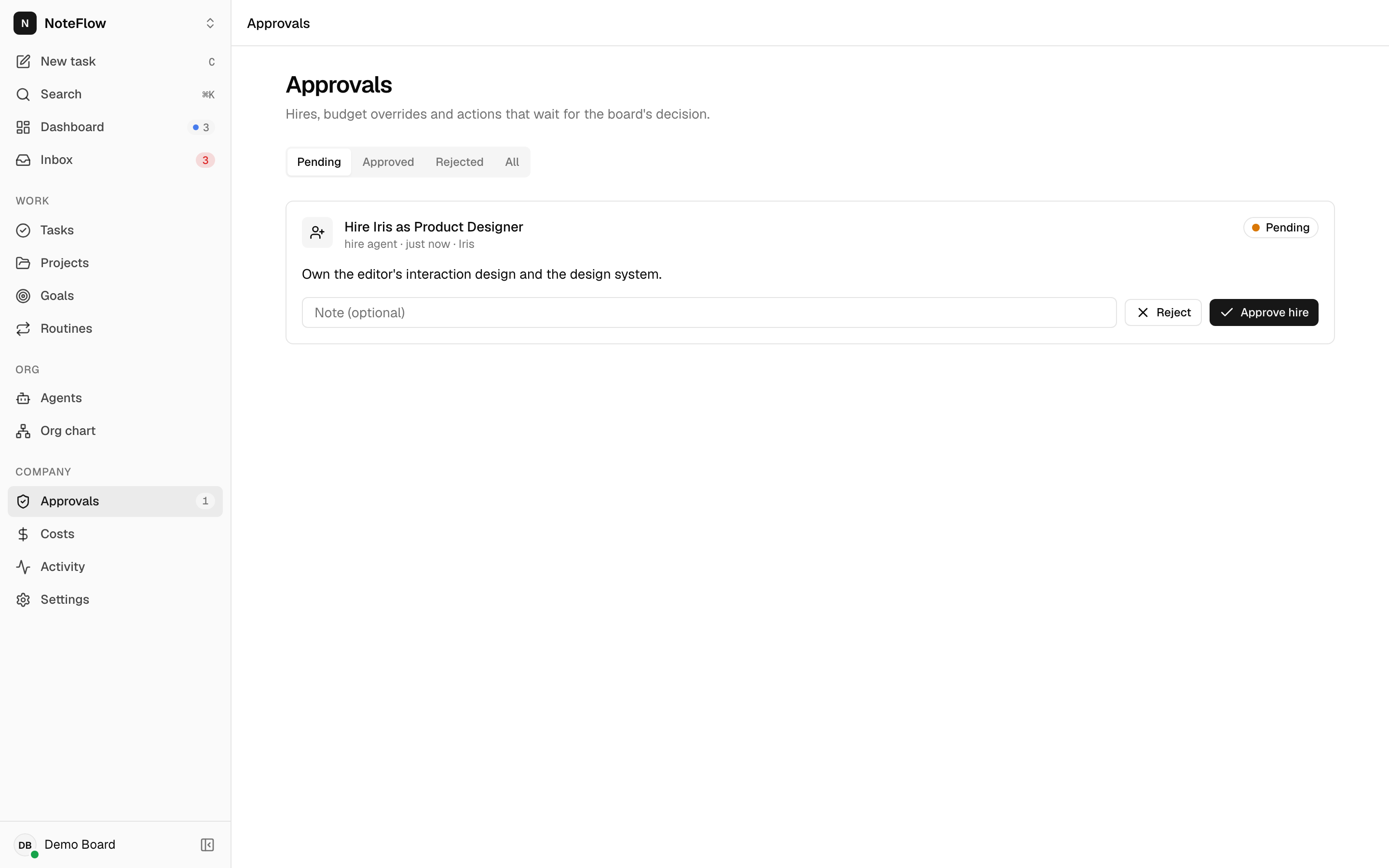
Open Approvals in the sidebar (the count badge shows pending approvals), or start from the inbox, which shows the same cards under "Waiting for your decision". Switch between Pending, Approved, Rejected and All.
Each card shows the type, the age, a link to the agent, the details and, once decided, the note. On a pending card:
- Type an optional Note.
- For a budget override, optionally type a New monthly budget (USD), for example
200. Leave it empty to raise the budget by one original budget. - Select Approve hire, Approve and resume or Approve, or select Reject.
Permissions
Any member of the company can list approvals and decide them. There is no separate "board" role and no check that the decider is not the person who requested a hire. Non-members get 404 NOT_FOUND.
Events
| Event | When |
|---|---|
approval.created | A hire with approval was submitted, or finishing a run paused an agent for budget. Sent without an id. |
approval.updated | An approval was approved or rejected. |
agent.updated | Sent with every decision that has a subject agent. |
The activity log records proposed (agent) for a hire with approval, paused (agent, by system) for a budget pause, and approved or rejected (approval) with the note.
Limits and known gaps
- Any member can decide; there are no approval roles, quorum or multi-step approvals.
- Decisions cannot be undone or changed. To reverse a rejected hire, hire the agent again.
actionapprovals are not created by anything yet.- Approvals are not sent anywhere (no email or chat notification). Watch the inbox,
sat inboxor the live event stream. - Only agent budgets open approvals. Company and project budgets never do; see Budgets and costs.
GET /approvalsreturns every approval in the company, with no limit or paging.
Related
Budgets and costs
When agents are paused and how spend is counted.
Inbox
Everything waiting on you, approvals first.
Agents
Hiring, pausing and resuming agents.
List approvals (API)
GET /api/companies/{company_id}/approvals
Approve (API)
POST /api/companies/{company_id}/approvals/{approval_id}/approve
Reject (API)
POST /api/companies/{company_id}/approvals/{approval_id}/reject