
 Smart Agent Teams
Views and preferences
Saved task views, pins, theme, density, accent, language, time zone and dashboard layout.
The web app remembers how you like to work. Saved views keep a set of task filters one click away, pins keep favourite agents and projects in the sidebar, and appearance and region settings control theme, density, accent colour, language, time zone and date format. Almost all of this is stored on your account (preferences on GET /api/me), so it follows you to every browser and device.
Where each setting lives
| Setting | Stored | Changed from |
|---|---|---|
| Theme (light, dark, system) | Account and this browser | Settings, account menu, command palette |
| Sidebar collapsed | Account and this browser | [ or the collapse button |
| Density, accent | Account | Settings → Appearance & region |
| Language and region, time zone, date format | Account | Settings → Appearance & region |
| Avatar colour | Account | Settings → Profile |
| Tasks list or board | Account | The List / Board toggle on Tasks |
| Saved task views | Account | Save view on Tasks; delete from the sidebar |
| Pinned agents and projects | Account | The pin button on an agent or project page; unpin from the sidebar |
| Dashboard range, card order, hidden cards | Account | Dashboard header and Customise |
| Properties panel open | This browser only | ] |
| Recent items in the palette | This browser only, per company | Opening agents, projects and tasks |
Every change is saved as soon as you make it and shown immediately. If saving fails, the change is undone and a message says why. The fields and merge rules are listed on Account.
Saved views
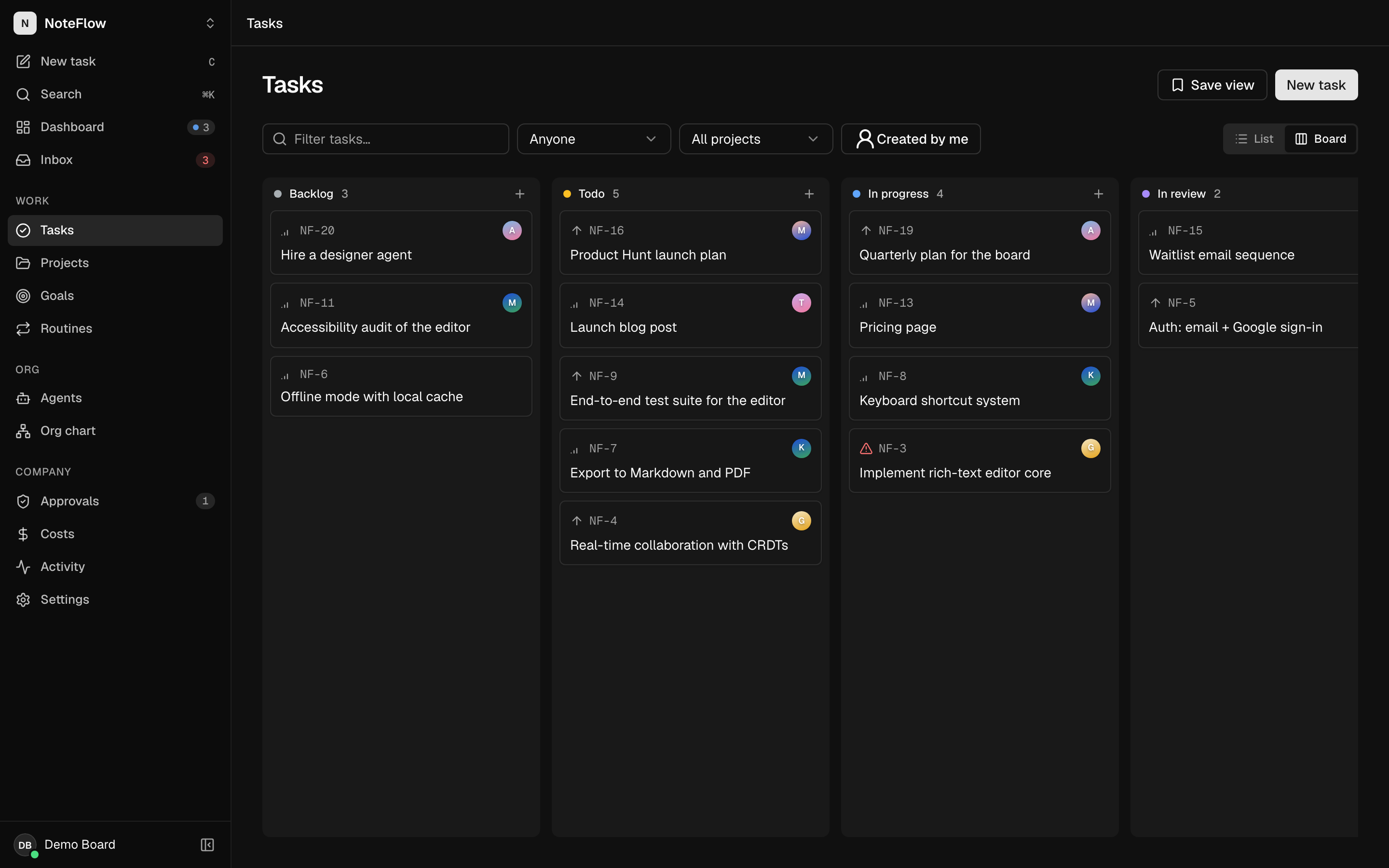
A saved view is a name plus the Tasks screen's query string, for example status=blocked&project=…&view=list.
Filter the Tasks screen
Set any combination of the text filter, status, assignee, project, Created by me and List or Board. Each one is written to the URL.
Save it
Select Save view, type a name such as "Blocked this week" and select Save view. The current query string is stored with the name.
Use it
The view appears under Views in the sidebar and in the command palette's Saved views group. Selecting it opens Tasks with exactly those filters.
To delete a view, hover over it in the sidebar and select the ×. Views cannot be renamed or updated; delete and save again.
Rules and limits:
- At most 20 views. With 20, the dialog says "delete one from the sidebar first".
- Names are up to 60 characters; the stored query is up to 500 characters (longer queries are refused by the API and the save fails with an error).
- Views belong to your account, not to a company. They appear in the sidebar of every company you open. A view that filters on an assignee or project stores that agent's or project's id, so in another company it matches nothing.
- The URL wins over your last-used layout: a view or link with
view=boardopens the board even if you last used the list. Withoutviewin the URL, Tasks opens in the layout you used last.
Pins
The pin button on an agent's or project's page adds it to Pinned in the sidebar and to the top of the command palette. Up to 50 agents and 50 projects. Like views, pins are per account; a pin from another company is simply not shown.
Appearance and region
Open Settings → Appearance & region.
| Setting | Options | Effect |
|---|---|---|
| Theme | Light, Dark, System | System follows the operating system's dark mode setting. |
| Density | Comfortable (default), Compact | Compact tightens spacing to fit more on screen. |
| Accent | Ink (default), Royal, Sky, Slate | Colour of primary buttons and focus rings. |
| Language & region | Browser default, English (US), English (UK), English (India), Deutsch, Español, Français, 日本語 | How numbers, amounts and dates are written. The interface text stays in English. |
| Time zone | Browser default, or any IANA zone | Times and dates on every screen, and the dashboard greeting. The hint shows the zone your browser reports. |
| Date format | Medium (default), Short, Long | Length of dates in timestamps. |
A line at the bottom previews the current date and time with your settings. Changing language, time zone or date format re-renders the current screen so every date updates.
Amounts are always US dollars, the currency agents are billed in. The language setting changes how a dollar amount is written (for example 1.500,00 $ in German), never the currency. Day and month boundaries for spend and charts are UTC regardless of your time zone.
Dark mode
Choose Dark in Settings, in the account menu (Theme) or with Switch to dark theme in the command palette. The choice is kept in the browser so the right theme shows before you are signed in, and saved to your account. When you sign in on a new device, the account's theme wins; after that, changes on any device are written back to the account.
Dashboard layout
On the dashboard, 7d / 14d / 30d sets the chart range, and Customise lets you drag cards into a new order and switch cards off. Reset layout restores the default order with every card shown. Cards added in later versions of SAT appear at the end of your order. See Dashboard.
Limits and known gaps
- Saved views and pins are not scoped to a company.
- Saved views cannot be shared with other members or renamed.
- The interface is English only; the language setting affects formatting, not translations.
- The
currencypreference exists in the API but has no effect. - There are no saved views for screens other than Tasks.