
 Smart Agent Teams
Inbox
One place for everything that needs a person: decisions, stuck work and failed runs.
The inbox answers one question: does anything need me right now? It collects pending approvals, tasks that are stuck or waiting for review, and runs that failed. It is a view, not a separate object: it reads approvals, tasks and runs, and an item leaves the inbox when the underlying approval is decided, the task moves on, or (for runs) it drops out of the recent window.
How it works
The inbox has three sections. The web app and the CLI do not use exactly the same rules:
| Section | Web app (/c/{companyId}/inbox) | sat inbox |
|---|---|---|
| Approvals | All pending approvals, as decision cards. | All pending approvals. |
| Stuck work | Tasks in blocked or in_review ("Blocked or waiting for review"). | Tasks in blocked only. |
| Failed runs | The 10 most recent failed runs, however old. | failed runs created in the last --since hours (default 24), taken from the 50 most recent failed runs. |
The Inbox badge in the sidebar and the "items need you" banner on the dashboard count pending approvals plus blocked tasks. They do not count in_review tasks or failed runs, so the badge can read 0 while the inbox page still lists tasks waiting for review or recent failures.
What clears an item:
- Approvals: approve or reject it; see Approvals.
- Tasks: move the task out of
blocked(orin_review), for example after answering the agent's question in the task thread. - Failed runs: nothing to dismiss. A failed run stays in the web inbox until 10 newer runs have failed, and in
sat inboxuntil it is older than--sincehours. Wake the agent again or reassign the task to retry.
The inbox is the same for every member: there is no per-person assignment of approvals or tasks.
Fields
The inbox has no object of its own. sat inbox --json returns:
Prop
Type
Use it
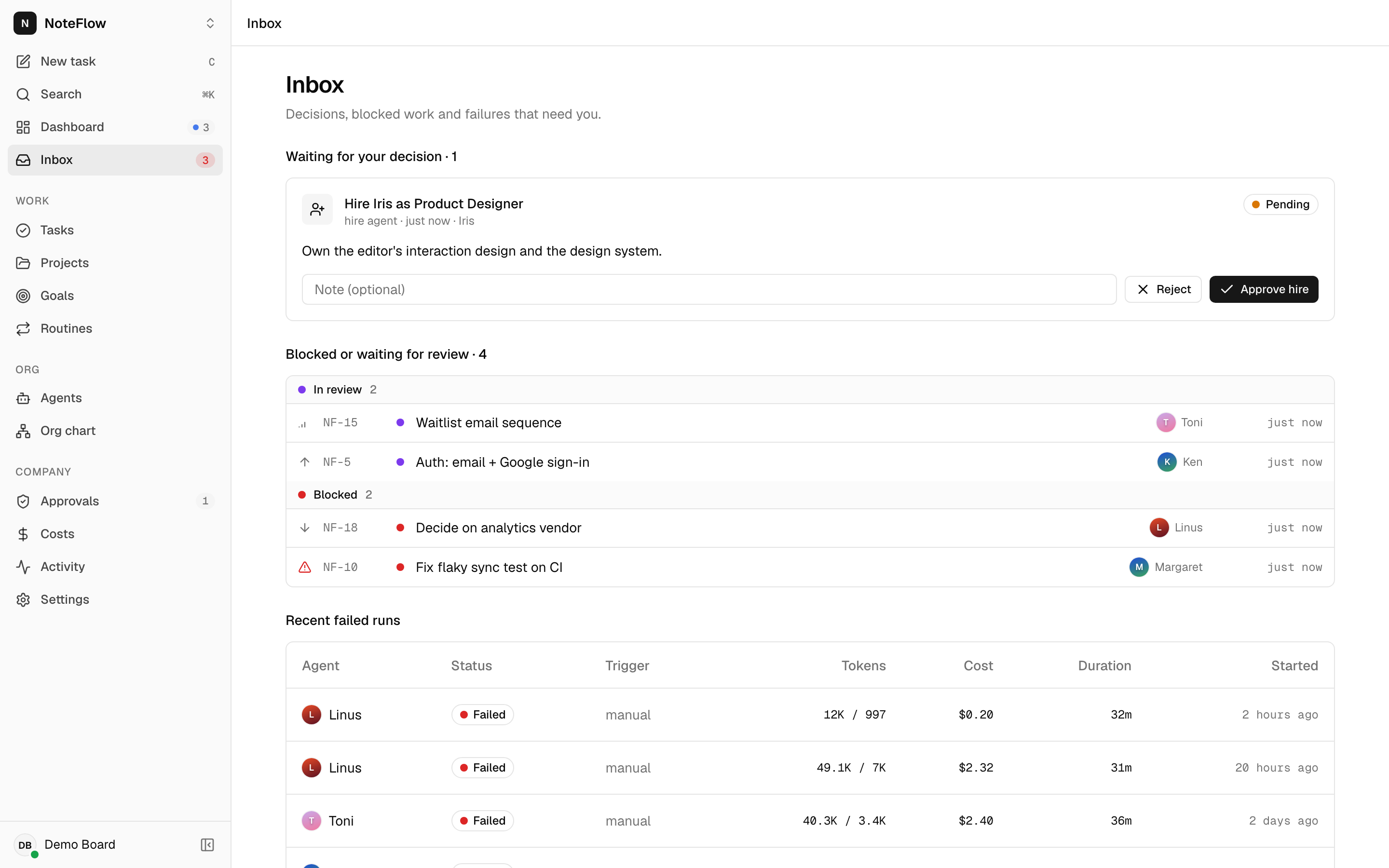
Open Inbox from the sidebar, the mobile bottom bar, the dashboard banner, or press G then I. Decide approvals directly on their cards. Select a task to open it (or use J, K and Enter in the task list), and select a failed run to see its error and transcript.
When there is nothing, the page shows "Inbox zero: Nothing needs you right now."
Permissions
Any member sees the full inbox and can act on every item. Non-members get 404 NOT_FOUND from the underlying endpoints.
Events
The inbox has no events of its own. The web app refreshes it on approval.*, task.* and run.* events from the live stream.
Limits and known gaps
- The web app, the CLI and the sidebar badge use different rules (see the table above).
- Failed runs cannot be acknowledged or dismissed.
- There are no notifications outside the app: no email, push or chat messages.
- The inbox is not personal. It does not filter to tasks you created or approvals you requested.
- Agent questions posted as comments with kind
questiondo not appear in the inbox unless the task is also moved toblockedorin_review.